
Jak zmienić hasło do FEPA.net ?
Nie lubisz albo nie pamiętasz swojego hasła ?
Ponieważ używamy funkcji Single-Sign-On zawsze będzie można zalogować się do FEPA za swojego konta na komputerze albo na zdalnym pulpicie bez podawania nazwy użytkownika i hasła. Będzie jednak potrzebne żeby użyć skanera podczas inwentaryzacji, albo żeby zalogować się na swoje konto z komputera kolegi.

You can choose your new password directly after the login by using the function “Change password”. Click first at the programs logo or the logo text in the top left corner [1]. After you click on the button “Change password” [2] a new program will open:
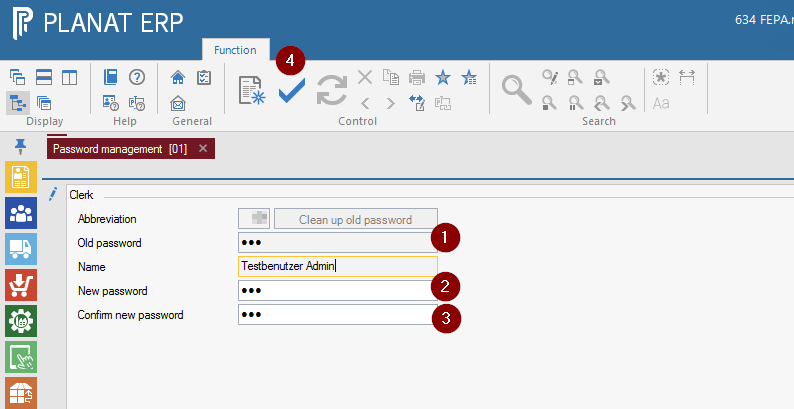
In this program your username will be filled automatically and you can only change your own password. At first enter your actual password [1] and hit return. Then you've been asked to provice a new password [2] two times for confirmation [3]. When you're finishe typing you must approve your change by pressing the OK button [4].
You lost your password?
When you lost your password the IT department can help you by setting a new password for you. Please just send an email to it-support@gemo.de to receive support.
Notes
As we’re using separate databases and infrastructures for each of our FEPA installations (FEPA testing system, FEPA productive system) the password change in one of the systems does not have any influence in the other system.
From time to time the IT department does a copy from the productive system to the testing system and under that circumstances your credentials from the productive system will become valid in the testing system automatically.
So please keep that in mind changing your password in one system and therefore it is a good idea to keep the same password in both systems.