
LAB: Errors and Warnings
This document is explaining the possible warnings and errors that can occur during the process of import delivery schedules (in further text just LAB – German abbrev. for “Lieferabruf”) in our ERP system FEPA.net. It also gives explanations about the root cause, general information and possible solutions.
When you find an error or need further or detailed assistance please send this document with comments to our IT ticket system: it-support@gemo.de.
General information
FEPA is working strictly according to the standard from the VDA (abbrev. for “Verein Deutscher Automobilindustrie”, German for “Society or German automotive industry”) and does not know any other EDI standard. Its only working with the VDA 4905 (delivery schedules), 4908 (credit notes) and 4913 (sending and receiving of transport information) standard.
But there is costumers (like the INTEVA-Group) who don't “talk” VDA. They are using a different standard like ANSI or EDIFACT from the American automotive industry. For FEPA we need to translate that standard to VDA and vice versa. That's happening in a special third-party-software called “EDI-management-software” maintained by external German company HILCOM.
Whether or not the costumer is sending via VDA is displayed in the filenames of the transferred files. This information is retrievable from the function “LAB-Info” and is also printed often on the specific protocols that fall out of the printer after reading files into the system. For example the costumers sending via VDA using filenames with the pattern “<Mandant-No.>_vda4905_<ConnectionShortcut>.<Running-No.>”. The part “_vda4905_” is the hint to the used standard “VDA 4905”.
Because all of this standards are not compatible to 100% it’s possible to have some warnings that will never disappear because VDA needs that information but a different standard does not provide it. This warnings are not solvable and will never disappear.
Also it’s very important that the person who is instructed with checking the LABs is also informed about the contract conditions. Often there is set if the customer is allowed to send us “immediate requirement” and how to handle that, how long we’re allowed to hold material or finished goods and also how long after “today” the customer is allowed to change dates (FIXUM).
Errors
Errors always leading to a stop in the import process in FEPA. It means that FEPA wouldn't go on with the import-process and print and paper with the error message on it. In this case we need a manual solution and the import-process for that specific delivery schedule must be restarted.
Depending on the customers connection (EDI via VDA standard or non-VDA-standard) the IT must help to solve the situation because it could be a problem with the translation between different EDIstandards.
No customer can be found / no single customer can be assigned
DE: Kein Kunde ermittelbar / Kunde nicht eindeutig ermittelbar
Will be processed: NO
The data that has been transferred within the header of the LAB like “EDI-Customer-No.” and “EDISupplier-No.” can’t be assigned onto one single entry in the “Costumer-plant-relations”. FEPA cannot find any data or finds more than one relation that fits. That's the reason FEPA cannot handle this situation on its own and need guidance.
Solutions:
- If the cause is a wrongly transmitted EDI number in the file the customer must be asked to resend the file with updated, correct data.
- If the cause is a missing Customer-plant-relation then it must be configured. Afterwards the LAB can be processed again.
No order can be found / no single order can be assigned
DE: Kein Auftrag ermittelbar / Auftrag nicht eindeutig ermittelbar
Will be processed: NO
The data that has been transferred within the header of the LAB like “EDI-Customer-No.” and “EDISupplier-No.” in combination with “plant no.”, “unloading point” and “customers article number” can’t be assigned onto one single sales order. FEPA cannot find any data or finds more than one sales order that fits. That's the reason FEPA cannot handle this situation on its own and need guidance.
Solution:
- The solutions depends in the root cause. The named fields must be checked. When the data is obviously causing the problem the customer should be informed and asked to send new, repaired data.
- The costumer-plant-relation could be corrected of the EDI numbers has been changed without noticing it.
- In the sales order the unloading point or the costumer article number can be corrected if that has been the problem.
- A new EDI sales order can be placed then some of the data has intentionally changes. Maybe because of a new project or index of an article. The old EDI sales order stays in the database for historical purposes. But the old EDI sales order should be “closed” and the open quantities that won’t be shipped anymore should be deleted (coordination with the production planning team needed)
- Most likely it’s just a new order from the costumer and the EDI sales order must be placed into the system before restarting the import process.
Item has not been found
DE: Artikel existiert nicht
Will be processed: NO
If FEPA does not know the Costumer-item-number the import process will be stopped and the message appears.
Solution:
- Place a new EDI sales order with that costumer article number.
Wrong date in position
DE: Fehlerhaftes Datum in Position
Will be processed: NO
When one of the positions in the LAB contains a wrong date, which is not possible according to the documentation of the standard like 34.01.2019 or 05.16.2019 then this error appears. FEPA stops the import. But please note that there is some special dates in the VDA 4905.
Here are some samples:
| Format | Description |
YYMMDD |
Date of the exact day when the costumer wants the material to be in its plant where “D” stands for day, “M” for month and “Y” for year. The numbers are always two-digits. So 180529 stands for 29.05.2018. |
000000 |
For that schedule there is done and has no more needs nor dates. |
222222 |
That stands for “no needs”. |
333333 |
That stands for backlog. The costumer has clearly set that information into his system. If it’s legitimate or not is not said here! |
444444 |
That means an immediate need. The costumers clerk has set up a special immediate need and wants GEMO to know about it. |
555555 |
The following dates have a change in type. For example instead of day-dates there will be week-dates following. FEPA will process that automatically and shows that in the EDI sales order. |
JJWWWW |
Need for the period between WW and WW. FEPA will calculate the need for the first day of that period. |
JJMM00 |
Need for one whole month. FEPA will calculate the first day of that month as date. |
JJ00WW |
Need for one whole week. FEPA will calculate the first day of that week as date. |
999999 |
Rest quantity for everything “after the last date”. |
Solution:
- The customer must be informed about that problematic LAB and should send a new, correct one.
Warnings
Only in some cases a warnings will stop the import process. In that case the specific solution must be applied and the delivery schedule can be processed. In all other cases the warning information is an information for the user to take care about a (mostly) minor problem.
Last LAB-No. is not according to saved LAB-No.
DE: Letzte LAB-Nr. stimmt nicht mit hinterlegter LAB-Nr. überein
Will be processed: YES
The LAB-No. is a number that is conducted by the costumer. Every rehash of the data on the costumers’ side will cause a count up on that number. When this warning is shown is means that there is an LAB lost between the actual one and the last one and it sometimes indicates a problem in the transmission. A gapless documentation of all the costumers needs is not given anymore.
Solution:
- The costumer should be informed about the fact that one LAB is missing. If the costumer is not working with LAB this warning has no impact because that number is only existing in the VDA standards.
Zeroing leads to negative actual cumulative number
DE: Nullstellung führt zu negativer Ist-FSZ
Will be processed: NO
The customer hast set a zeroing for that LAB. FEPA has applied that in the database and reset the inflow cumulative number to zero. When the actual cumulative number was smaller (what is an error itself) it leads to a negative actual cumulative number on GEMO-side.
If the costumer has done that zeroing without informing GEMO about it than it can cause an long time of no planned deliveries. Because combining the both cumulative numbers aggregate to the so called “quantity on transport”. This quantity is used by FEPA to reduce the amount that has to be delivered in the future. To prevent that the field “maximum quantity on transport” should be used in the EDI sales orders. Please also see section “Quantity on transport is higher then allowed”.
Costumers without VDA normally don't use zeroing after all because it’s not a required field. When a new connection to a costumer is being established it should be always asked if zeroing will happen or not.
Solution:
- The actual cumulative number must be set to 0 again manually.
- In the EDI section of the EDI sales order it must be checked if the date of the zeroing is correct. Is must match the date the customer has send in the LAB.
Zeroing leads to negative quantity on transport
DE: Nullstellung führt zu negativer Ware auf Transport
Will be processed: NO
Solution:
- Same reason and solution like section “Zeroing leads to negative actual cumulative number”.
Negative value for quantity on transport
DE: negativer Wert für Ware auf Transport
Will be processed: NO
Quantity on transport (“WAT” in German; abbrev. for “Ware auf Transport”) is always calculated and never saved in the system. It’s always the difference from actual and inflow cumulative number. The quantity can only be negative when the inflow cumulative number is bigger than the actual one. That can happen, when the costumer or the supplier mistreat a process (like from amount while inflow booking).
Here some examples:
- The customer books more inflow then was delivered on the delivery note.
- The supplier changes its cumulative number wrongly.
- The customer books one delivery note that was not belong to the EDI process.
Solution:
- The cumulative number has to be recalculated and corrected in the EDI sales order.
Transmitted unit of measurement is not according to saved UM
DE: übertragene ME stimmt nicht mit hinterlegter ME überein
Will be processed: YES
In the delivery schedule the customer sends his unit of measurement (UM). If the source system is for example in English language the UM will differ from FEPA in some measurements. PCS in English language stands for pieces. In German language (and therefore in FEPA) it will be ST for “Stück”. Anyway in the VDA the German UM are defined and using the English ones is comprehensive but wrong.
The same warning occurs then the customer changes it’s UM from G to KG or M to KM.
Solution:
- The LAB has to be checked according the amounts and the customer possibly has to be informed about it.
Data for last received delivery is not correct
DE: Daten zur letzten vereinnahmten Lieferung nicht korrekt
Will be processed: YES
When the sent value for the delivery number has been found in FEPA then some attributes like date of the delivery note, item number and quantity will be checked as well. If one of the transmitted information are not according the FEPA values the warning will occur.
If customers are not using VDA but EDIFACT or ANSI the field “last delivered quantity” is not mandatory (in VDA it is). That's the reason that LABs will always print that warning. We cannot suppress that.
Solution:
- The customer must be informed about that and according to the process the customer has to check and resend that LAB. If just the quantity is wrong basically a correction in the actual cumulative number is enough. But it’s always better to get the correction from the costumer side.
Quantity on transport is higher then allowed
DE: WAT übersteigt maximale WAT
Will be processed: NO
In the header of the EDI sales order there is a field “maximum quantity on transport / maximale WAT”. That's not according to the VDA standard but can help against big mistakes in the cumulative number that is sent by the customer. When the calculated quantity on transport is too high the import process will be stopped and the message will be printed. For example that occurs when the customer does a zeroing without informing about that before sending the data.
Solution:
- The cumulative number must be corrected in the EDI sales order. Afterwards the LAB can be processed again.
FEPA loading equipment number could not be assigned
DE: FEPA-THM-Nr. konnte nicht ermittelt werden
Will be processed: YES
THM stands for the German “Transporthilfsmittel” and means the loading equipment. It means everything that is needed to pack products for shipment. The customer can send requirements for loading equipment and if he does – FEPA will check them. This warning occurs, when the number the customer is sending cannot be found in the FEPA master data for loading equipment.
Most likely that's the case, when the customer is changing its numbers without informing GEMO about that fact. To prevent complaints because of wrong packaging numbers the new numbers should be entered to replace the old ones.
So see the requirements from the customer you must have a look into the register “EDI data”, second register “Loading Equipment” of the EDI sales order. In the area “Requisition (DS)” you’ll see the requirements.
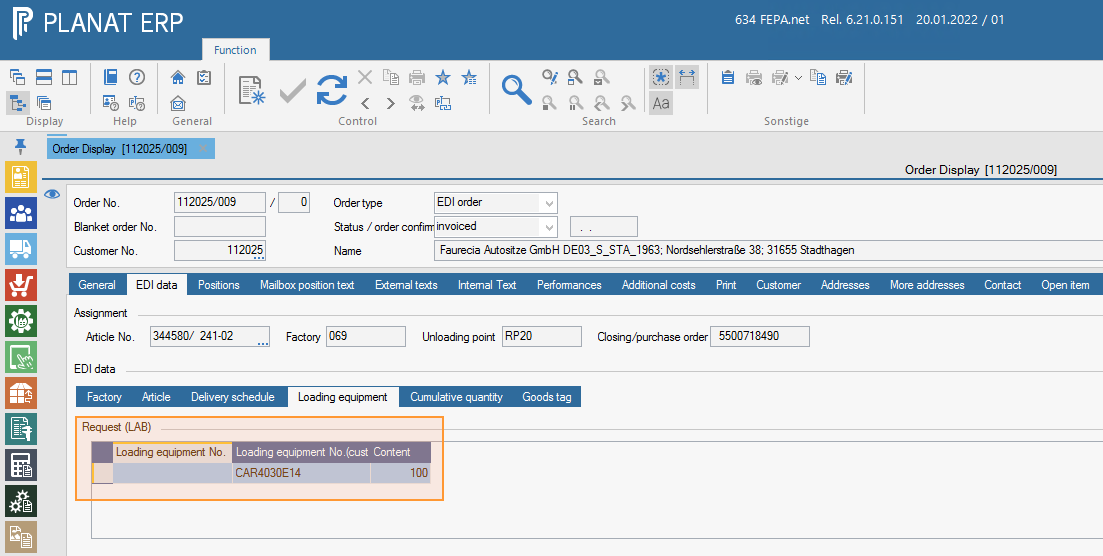
In the column “Loading Equipment No. (Customer)” is the number displayed the customers requires, added with the information about the quantity one box / carton / pallet / container can keep. If the columns “Loading Equipment No.” is empty – like in the screenshot - it means that FEPA couldn’t find any information about that number and the warning was printed.
The new number can be updated into “FEPA.net / Master Data / Loading Equipment / Edit Loading Equipment”. If the information from the customer is wrong, the customer should be informed about that fact.
No contact person has been found to sign of customer
DE: Kein Ansprechpartner zum Zeichen des Kunden gefunden
Will be processed: YES
In the delivery schedule is a field called „sign of customer“. This is very often used to send the code of the clerk responsible for the schedule. If this message appears FEPA was not able to find the correct clerk for that transmitted code.
Solution:
- The new contact person must be placed in FEPA and connected to the “contact person pool” of the customer.