Inventory with scanners
Open stocktaking
FEPA function: Materials management > Stock-taking > Open/edit stock-taking
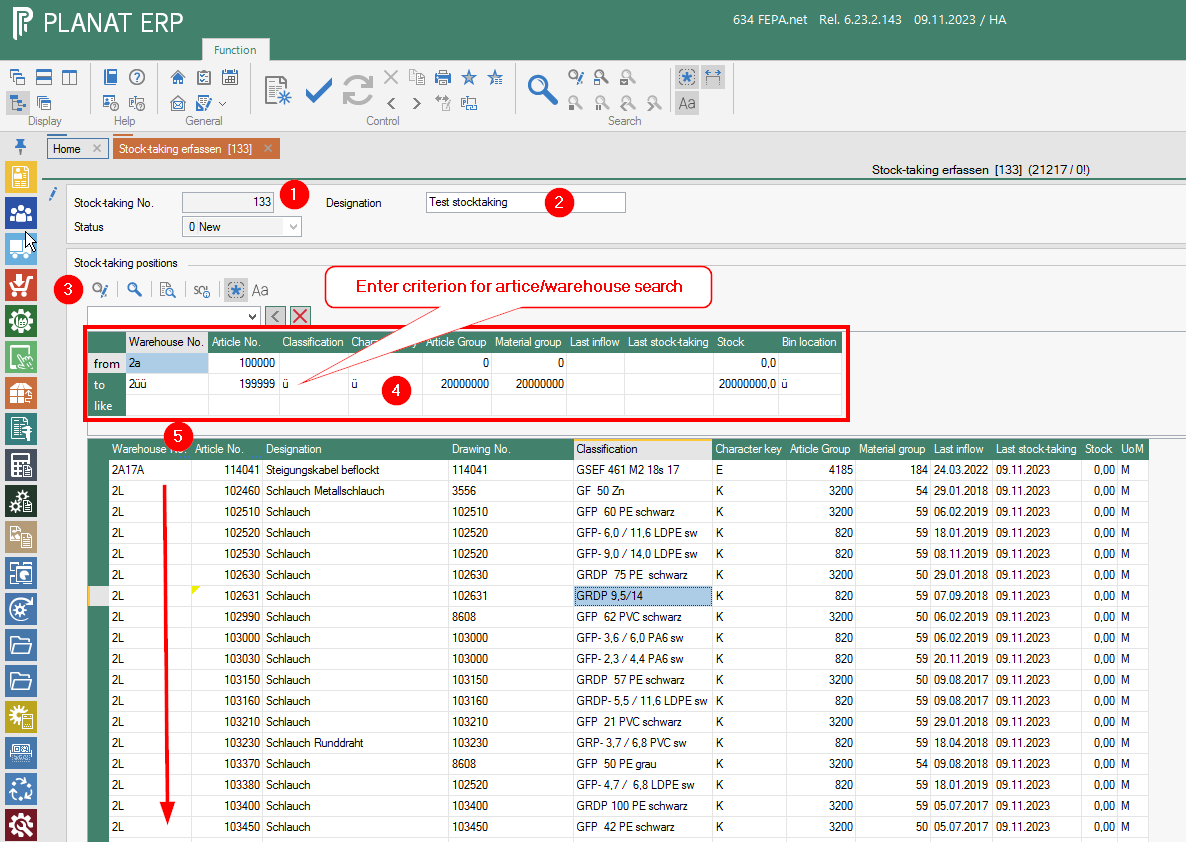
A number is automatically assigned for each new stocktaking. The last number can be stored under Utilities > Company master data > Sequence numbers.
The proposed number can be changed; an existing number can also be entered.
New entries can be added at any time to an inventory that has not yet been completed. The name of the inventory should contain at least the own FEPA mandant or the warehouse prefix for a better overview of the inventories. See stock-taking- Info.
The article/warehouse combinations to be included in the current stocktaking can be selected according to the following criteria
- Warehouse no.
- Article no.
- Classification
- Character key
- Article group
- Material group
- Date of last inflow
- Date of last stocktaking
- Stock (quantity)
- Storage location (if used)
(from - to) can be selected (the search library can be extended, please open a ticket for this if required).
Procedure:
- enter, (number will be assigned automatically, alternatively you can enter your own number), Enter
- Naming - assign a name for the stocktaking, Enter
- Expand search - click magnifying glass with pen
- Enter search criteria, click magnifying glass
- Check result! Only storage location/article combinations for your own location may be included. Individual lines can be deleted. (Warehouse no. must start with your own client!) - If this is not the case, close without saving and start again.