Delivery Condition
General
Here it is possible to create any number of quantity, price and discount scales. A validity date must be set for these scales.
Edit delivery condition
FEPA function: Purchsing > Delivery conditions > Edit delivery condition
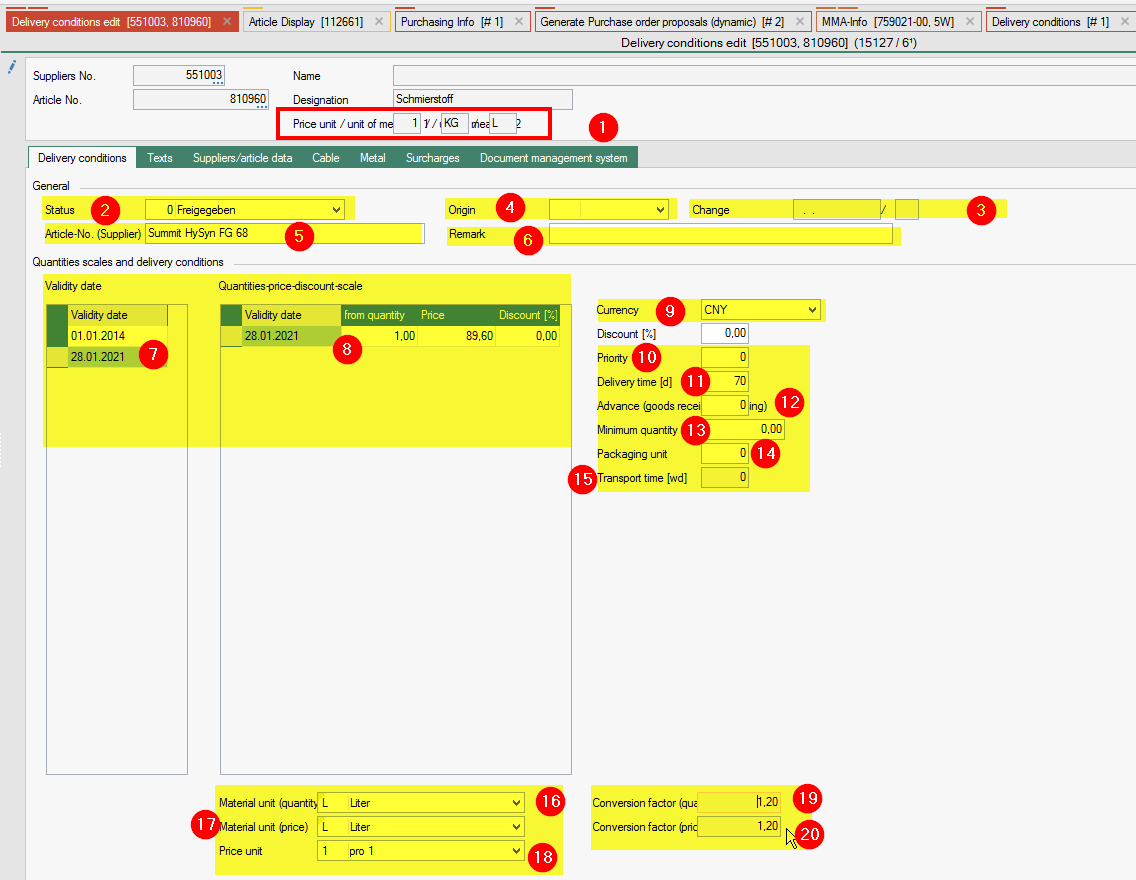
- In the header we see the unit of measure 1+2 as well as the price unit from the article master.
- Status (drop-down menu): A status can be assigned to a delivery condition (Maybe you talk with the CPO – change the status to English language instead of German)
- Change (date and person in charge): For information purposes, it is displayed which person in charge last changed the status and when.
- Origin (drop-down menu): From the country table (see Utility Programs, Tables, Sales / Purchasing, Countries) a country of origin can be assigned to the delivery condition.
- Supplier article number (30 digits): In this data field you can enter the article number under which the purchased part is listed at the supplier. The value of the supplier's article number can be output on request and order by means of report adjustment.
- Remark (50 digits): A remark can be entered for the delivery condition for information purposes.
- Validy Date: Edit the line and enter a validy date.
- Quantities-price-discount-scale: edit the lines as far as you have scale prices. Enter the “from Quantity”, the price and the discount (%) for each quantity & price from this validity date.
- Currency (drop-down menu): You can select from the currency table to which currency the price of the delivery condition refers. The currency from the supplier master data is suggested for a new entry
- Priority (1 N): The priority determines the importance of the selected supplier for the item being processed; the lower the priority number, the higher the supplier's priority for the item. Analogous to the delivery time information, the priority serves as a visual decision-making aid when there are several suppliers to choose from. When selecting suppliers within the function Enter order items, the suppliers appear sorted in ascending order of priority. As there is no other functionality in the FEPA standard behind the priority, the same priority can be assigned to several suppliers. However, if the function Pre-calculation with graduated prices is used, it should be noted that the price is determined on the basis of the delivery conditions of the preferred supplier (priority = 1). This should therefore only be assigned once per article.
- Delivery time [days] (3 N): This data field specifies the average delivery time of the selected item from the selected supplier. This information is to be understood as additional information for the selection of an optimal supplier if an item is offered by several suppliers.
- Advance (goods receipt processing) in working days: Lead time for the delivery in purchasing in working days. When entering enquiry / order or award order items, the delivery date is pre-set from the delivery date minus the lead time for delivery. The delivery date can still be changed manually in the enquiry / order or award order item. In the case of order confirmation and goods receipt, the delivery date is displayed on the item screen. This entry only overrides the global value Delivery lead time (Utilities / Company data / Programme control / Purchasing) if a value other than 0 is entered
- Minimum quantity: The minimum quantity defines the smallest order quantity that the supplier can deliver.
- Packaging unit: The packaging unit tells the packaging quantity if the supplier can only deliver the item in certain quantities. If an entry greater than zero is entered in the packaging unit, the order quantity should be a single or multiple of the packaging unit.
- Transport time (weekdays): displays the entered transport time from the supplier address
- Material unit (Quantity) (unit of measure) drop-down menu: A unit of measure for this delivery condition can be selected from the unit of measure table (see Utilities, Tables, Master Data, Units of Measure).The unit of measure determines the unit in which the article is ordered from the supplier in terms of quantity. The quantities of the scales are also related to this unit of measure. The unit of measure can be different from the first or second unit of measure in the article master, in which case the data field U-factor (quantity) is additionally released for entering the corresponding conversion factor. If available, the second unit of measure from the article master data is suggested (in this case the conversion factor for the first unit of measure according to the article master also applies), otherwise the first unit of measure according to the article master is suggested.
- Material unit (price) (unit of measure price) drop-down menu: A price unit of measure for this delivery condition can be selected from the unit of measure table. The price unit determines the unit in which the article is ordered from the supplier in terms of price. The price unit can be different from the first or second unit of measure in the article master, in which case the data field U-factor (price) is also released for entering the corresponding conversion factor. If available, the second unit of measure from the article master data is suggested as the price unit of measure (in this case the conversion factor (price) for the first unit of measure according to the article master also applies), otherwise the first unit of measure according to the article master.
- Price unit (drop-down menu): The price unit is defined (see utilities/Tables/Master data/Price units) to which the information in the price scales refers. When entering new conditions, the price unit from the article master is suggested here.
- Conversion factor [Quantity] (3.4 N): In the conversion factor field, the conversion factor of the unit of measure (material unit (quantity)) to the first unit of measure in the item master can be entered if the unit of measure of the delivery conditions was entered differently to the first or second unit of measure of the item master. The conversion factor represents the relationship between unit of measure 1 in the article master and the unit of measure (material unit (quantity)) and must be non-zero. Required here is: How many units of the unit of measure (material unit (quantity)) are required for one unit of the 1st unit of measure in the item master.
- Example 1: 1st unit of measure metre
Unit of measure (quantity): kilogramme
In this case, the number of kilograms that a metre weighs must be entered in the factor. - Example 2: 1st unit of measure metre
Unit of measure (quantity): Roll
If there are 100 metres on a roll, enter 100 in the factor.
- Example 1: 1st unit of measure metre
- conversion factor [Price] (3.4 N): In the conversion factor field, the conversion factor of the unit of measure (material unit (price)) to the first unit of measure in the item master can be entered if the unit of measure of the delivery conditions was entered different to the first or second unit of measure of the item master. The conversion factor represents the relationship between unit of measure 1 in the item master and the unit of measure (material unit (price)) and must be non-zero (see example for unit of measure “material unit (quantity)” and conversion factor quantity).